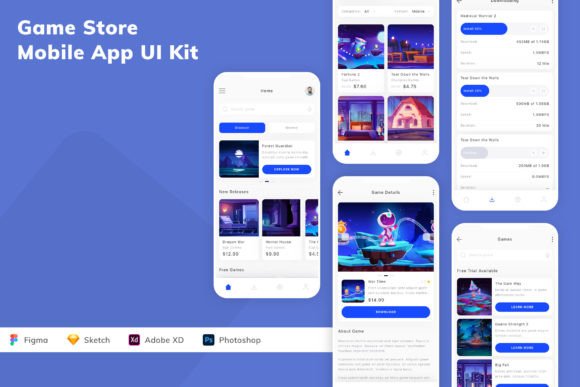
Game Store Mobile App UI Kit: A Modern Design Solution for App Development
Designing a mobile app for a game store can be both exciting and challenging. With user expectations rising and design trends evolving rapidly, developers and designers need tools that simplify the creative process without compromising on quality. The Game Store Mobile App UI Kit offers a streamlined approach to building visually appealing and functional game store apps. Built with modern design principles in mind, this UI kit provides a comprehensive set of tools to help creators bring their ideas to life efficiently.
What Is the Game Store Mobile App UI Kit?
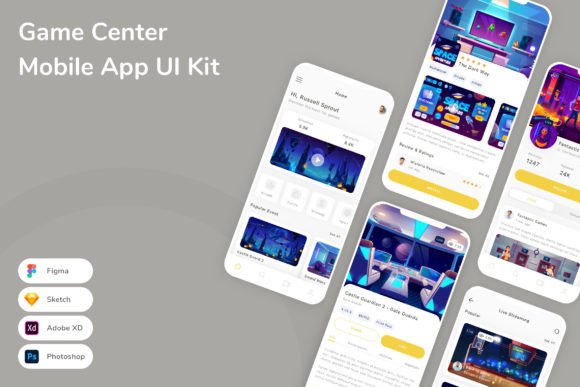
The Game Store Mobile App UI Kit is a design resource that includes a wide range of user interface components tailored specifically for game store applications. Whether you're designing a marketplace for mobile games, a platform for indie developers, or a store for downloadable content, this UI kit provides the foundational elements you need to create a polished and professional app.
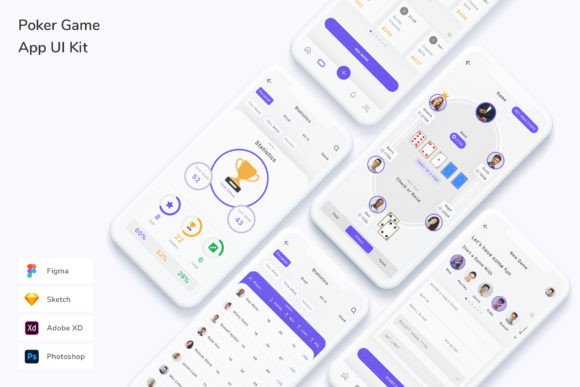
Available in popular design tools like Sketch, Figma, Adobe XD, and Adobe Photoshop, it ensures compatibility and flexibility across different workflows. Each screen and component is crafted with precision, ensuring pixel-perfect visuals and seamless integration into your development pipeline.
Key Features of the UI Kit
One of the standout aspects of the Game Store Mobile App UI Kit is its comprehensive feature set. Here are some of the most valuable components and characteristics:
- Pixel-Perfect UI Elements: Every button, menu, and card is designed with precision, ensuring your app looks sharp on all devices.
- Customizable Layers, Fonts, and Colors: Modify the design to match your brand with ease, thanks to well-organized layers and accessible color and font settings.
- Well-Layered and Organized Files: The structure of the UI kit makes it easy to navigate and edit, even for those new to the toolset.
- High-Quality Screens: Includes a variety of ready-to-use screens such as home pages, game detail views, search interfaces, and checkout flows.
- Free Fonts and Icons: The kit comes with licensed fonts and icons, reducing the need to source assets from external libraries.
- 100 Customizable Vector Shapes: Offers flexibility in creating unique layouts and graphics without losing quality.
Who Can Benefit from This UI Kit?
The Game Store Mobile App UI Kit is ideal for a wide range of users:
- Independent Developers: Those building their first game store app can save time by leveraging pre-designed templates instead of starting from scratch.
- UI/UX Designers: Professionals can use the kit as a foundation for client projects, speeding up the design process while maintaining a high level of quality.
- Startup Teams: Early-stage companies can use the UI kit to prototype and test their ideas before investing in custom development.
- Marketing Professionals: Those looking to create branded game store experiences can use the kit to visualize and present their ideas more effectively.
Real-World Applications
Let’s look at a few real-world scenarios where the Game Store Mobile App UI Kit can make a significant impact:
- Launching a New Game Marketplace: If you're creating a new platform for mobile game downloads, the UI kit gives you a head start with screens for game listings, in-app purchases, user profiles, and more.
- Redesigning an Existing App: For teams looking to modernize their current app interface, the kit provides a clean and contemporary design language that aligns with today’s trends.
- Prototyping for Investors: Startups pitching to investors can use the UI kit to build high-fidelity mockups that clearly communicate the app’s functionality and user experience.
Why This UI Kit Stands Out
With so many UI kits available, what makes the Game Store Mobile App UI Kit a standout choice?
First, its focus on modern design trends ensures that your app feels fresh and up-to-date from the start. Whether it’s rounded corners, bold typography, or intuitive navigation, the kit incorporates the latest design standards.
Second, the team behind the UI kit is continuously improving and expanding the template. As new features and design elements are added, users gain access to updated resources that enhance the kit’s versatility and performance.
Lastly, the ease of customization allows both beginners and experienced designers to adapt the kit to their specific needs. Whether you're tweaking colors to match your brand or rearranging layout elements to suit your app's functionality, the process is straightforward and intuitive.
Practical Considerations and Limitations
While the Game Store Mobile App UI Kit offers many advantages, it’s important to understand its limitations to set realistic expectations:
- Learning Curve: While the UI kit is designed to be user-friendly, those unfamiliar with design tools like Figma or Sketch may need to invest time in learning the basics.
- Customization Needs: Although the kit is highly customizable, some projects may require additional design work to fully align with a unique brand identity or feature set.
- Not a Full App Solution: The UI kit provides the visual framework but does not include backend development or coding components. Developers will still need to implement the logic and functionality behind the screens.
How to Evaluate Suitability for Your Project
Before adopting the Game Store Mobile App UI Kit, consider the following factors to determine if it aligns with your project goals:
- Project Scope: Is your app a simple game store or a complex platform with multiple features? The UI kit works best for mid-sized applications where speed and design quality are key priorities.
- Team Expertise: If your team has access to UI/UX designers, the kit will be easier to integrate. If not, you may need to collaborate with a designer or invest in training.
- Time Constraints: If you're on a tight deadline, the UI kit can significantly reduce the time spent on the design phase, allowing you to focus on development and testing.
- Long-Term Vision: If you plan to scale your app over time, ensure that the UI kit offers enough flexibility to grow with your needs. The continuous updates and additions to the kit make it a strong candidate for long-term use.
Conclusion
In the fast-paced world of mobile app development, having the right tools can make all the difference. The Game Store Mobile App UI Kit offers a modern, flexible, and scalable solution for building game store applications. With its comprehensive set of features, user-friendly design, and ongoing updates, it's a valuable asset for developers, designers, and entrepreneurs alike.
Whether you're launching a new project or enhancing an existing one, this UI kit provides the foundation you need to create a stunning, functional, and user-friendly game store app. By leveraging its capabilities, you can streamline your design process, reduce development time, and focus on delivering a high-quality experience to your users.